Every card is a real contact
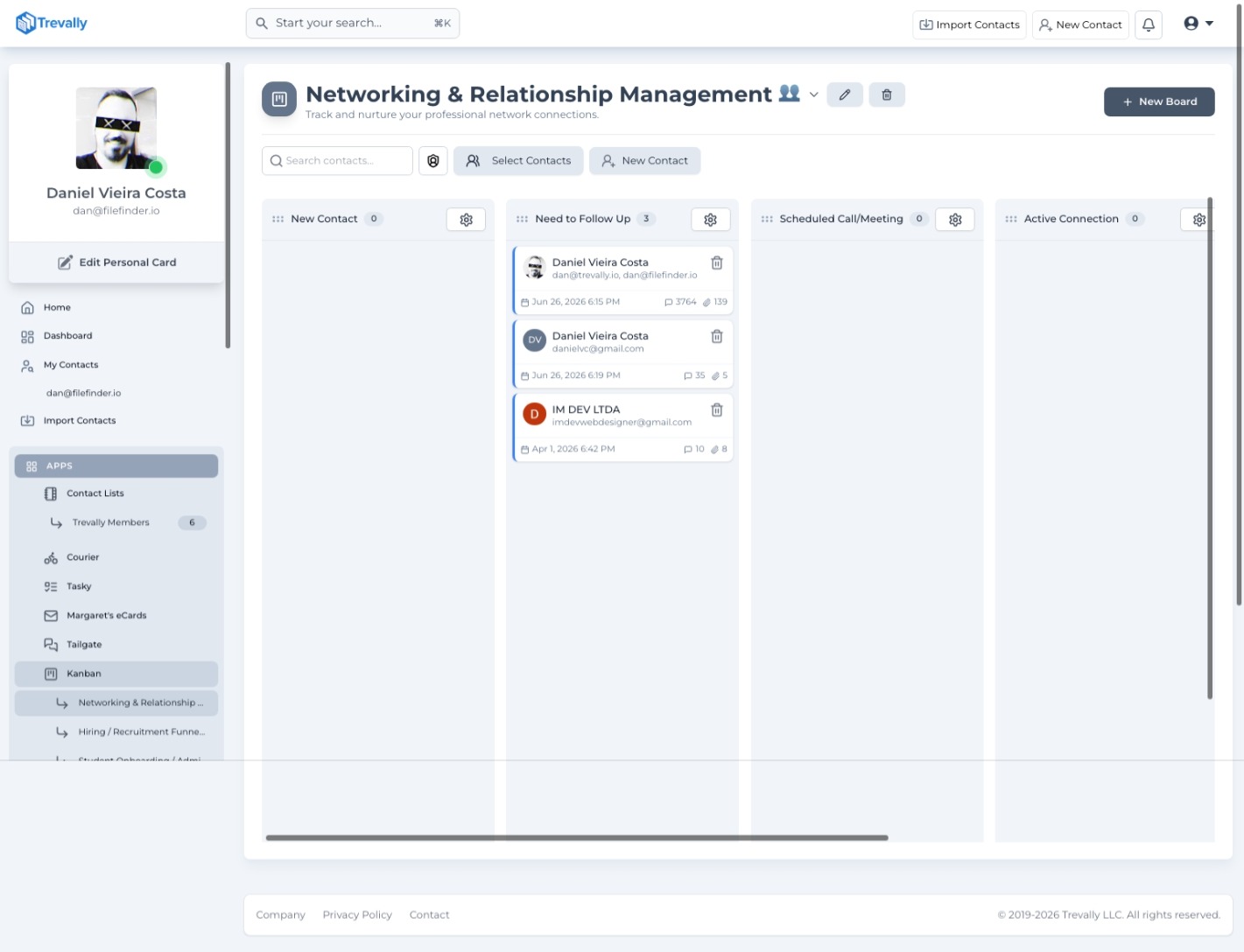
Every pipeline is really a list of people moving through stages: leads becoming customers, candidates becoming hires, buyers becoming owners. Most Kanban tools make you retype those people as cards. Trevally doesn't. Each card is a living contact, carrying the full history you already have: every email exchanged, every file they sent, and a live counter of how many messages have gone back and forth. You can see at a glance exactly how long a contact has been in the current stage, so the deal that has been sitting in Proposal Sent for three weeks is impossible to miss.
Automate each stage
Columns can act on their own. Attach event triggers to any stage and when a contact lands there, Trevally runs them in sequence: wait a set number of minutes, hours or days; send a personalized email using the contact's own attributes (type {{ and insert their first name, company, or any field on their card); repeat the previous action; or deliver a file or a link. One sequence, written once, addressed personally to every contact who enters the stage. And the detail that makes it safe to trust: moving a contact to another column immediately cancels their pending automations from the previous stage, so the candidate who just accepted your offer never receives the automated follow-up.

Built for teams and conversion tracking
Boards are built for teams. Invite collaborators as Viewers, Members or Admins: pending invitations are tracked with resend and cancel controls so nobody falls through before they join. WIP limits cap how many contacts can sit in a given stage at once, turning bottlenecks into visible facts instead of surprises. A built-in analytics view reports total contacts, conversion rates between every pair of stages, and a chart of how people are flowing through the pipeline: the numbers a recruiter presents on Friday and a founder checks before standup.

What you can do
- 4-step setup wizard: board info, columns with WIP limits, team members, contacts
- Drag-and-drop cards between stages; drag columns to reorder the pipeline
- Time-in-stage and live message and attachment counters visible on every card
- WIP limits per column: cap the number of contacts allowed in a stage at once
- Column event triggers: Wait, Send Message, Repeat Event, Send File, Send Link
- Merge fields in automated emails: insert any contact attribute (first name, company, and more) with optional fallback defaults
- Moving a card cancels all pending automations from the previous column immediately
- Team roles: Viewer, Member, Admin, with pending invite resend and cancel controls
- Board analytics: conversion rates between stages and contact flow charts
- Fill a board from individual contacts, contact lists or entire CSV imports in one click
See it with your own contacts.
Connect your email and your contact base builds itself, Kanban Boards included.
Connect your inbox for freeRead-only access. Revoke anytime. Your data stays yours.